One of the pleasures of Omarchy is making the desktop your own. A cloned plugin gives you room to change how something looks or works. The awkward part comes later, when the original improves and your customized copy has moved in a different direction.
Clone Keeper helps bring those changes back together. It keeps a copy of the original plugin, compares your edits with the newer upstream version, and gives you a review before anything is applied.
Clone Keeper is now available on the Omarchy Plugin Marketplace. It is an open-source beta with a native desktop panel and a command-line companion.
Keep the changes that make it yours
The panel shows which plugins have updates and whether their changes merge cleanly. You can inspect your edits, the upstream changes, and the proposed result file by file. When both versions change the same lines, choose what to keep or open the candidate in your editor.
New clones start with their original source saved. For existing customizations, Clone Keeper can look through locally installed Omarchy releases and cached packages for a likely original. You choose the baseline; a suggested match is evidence to inspect, not proof of where a clone came from.
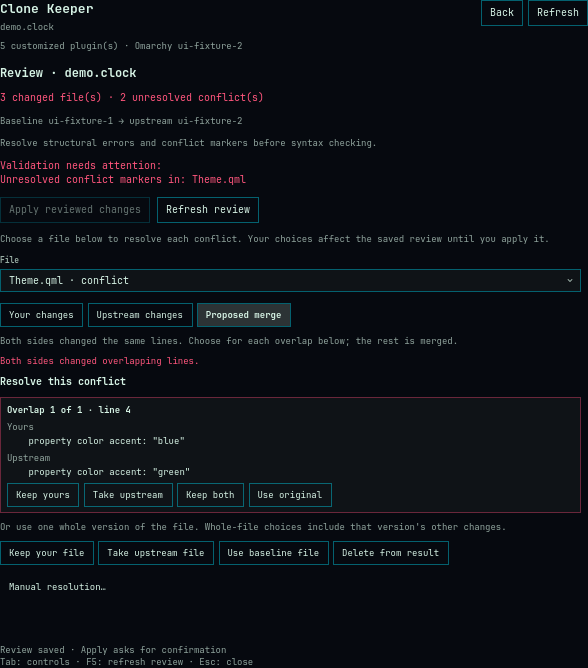
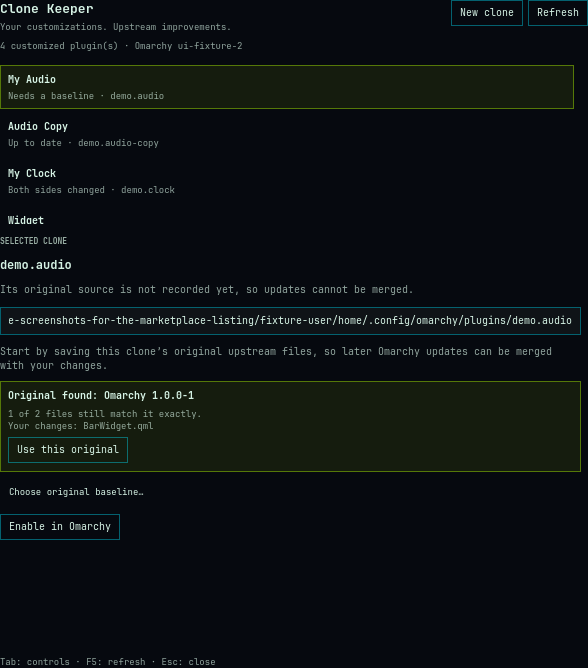
Review, apply, and come back if needed
Applying an update saves a backup and advances the recorded original, so the next update can still distinguish your customizations. Undo restores the previous files and baseline. Saved reviews can be resumed, and recovery handles interrupted operations.
Clone Keeper also supports plugins installed from Git that you have edited locally. An explicit update check fetches upstream changes; after a reviewed update, your edits remain visible as local changes in Git.
The current release is 0.4.0 beta, tested with Omarchy 4.0.4. A clean merge or a successful load check cannot establish that every customization behaves as intended, so testing the updated plugin still matters. The validation notes describe what has been exercised and the remaining desktop checks.
Try it on your desktop
Clone Keeper is MIT licensed and needs Linux, Python 3.11 or newer, Git, and Omarchy’s plugin-capable Quickshell desktop for the panel. The installation instructions cover setup, updating, removal, and the standalone CLI.
Find Clone Keeper on the Omarchy Plugin Marketplace · Explore the source on GitHub · Back to projects