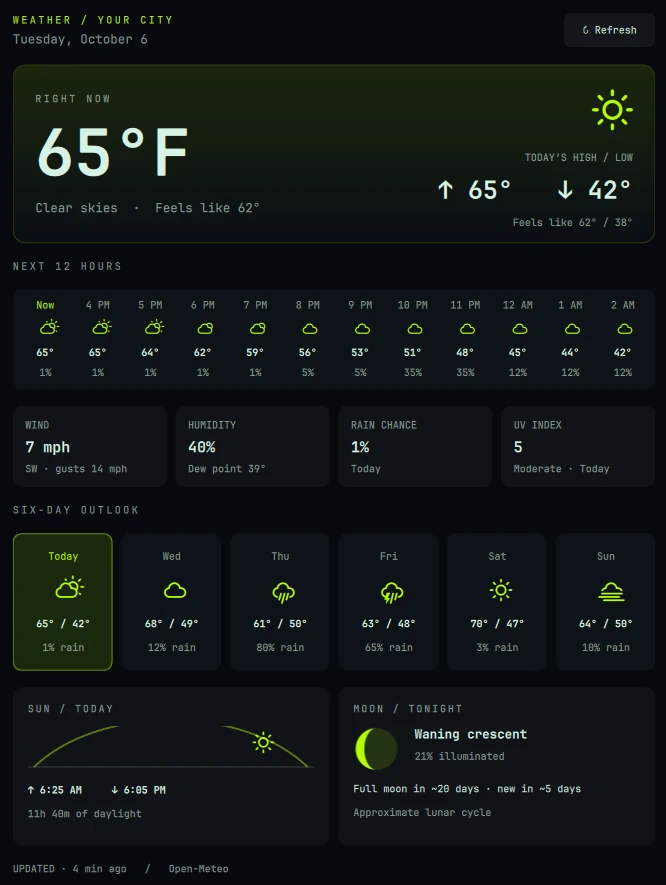
Weather / Neil is another small addition to my Omarchy desktop. It puts the temperature in the bar and a more useful picture of the day behind a click: what it feels like, when rain might arrive, and how the next few days are shaping up.
Like Acid Alerts, it follows the active Omarchy theme. The panel uses the desktop’s colors, spacing, and typography, so it feels at home alongside the other things in the bar.
Weather / Neil is available on the Omarchy Plugin Marketplace.
The day at a glance
Open the panel for current conditions, feels-like temperature, wind, humidity, and today’s full high and low. The next twelve hours sit below that, followed by six forecast cards. Select a later day to see its hours, expected rain or snow, UV index, and daylight.
The latest repository version also estimates when rain or snow will start or ease within the next four hours, shows air quality, and brings in National Weather Service alerts for US locations. Desktop notifications are optional and off by default; you can enable them for watches and warnings, or also for rain and snow about to start.
A sun arc and a drawn moon phase give the panel a quieter finish. The lunar estimates are approximate, with illumination and time until the next full and new moon.
A forecast with some context
Weather comes from Open-Meteo, and current conditions are modeled. In the US, recent precipitation reported by a nearby NWS station can update the current condition and icon. That helps when the forecast says overcast but a nearby station is reporting rain, though a station can still miss a local shower.
Saved forecasts appear while a new request runs. If information gets old, the panel labels it as saved or last known and dims the bar entry. Forecast dates follow the location’s timezone. NWS alerts are an additional place to notice a warning while using the computer; they depend on network access and periodic checks.
Try it on your desktop
The plugin is MIT licensed and needs Omarchy’s Quickshell plugin runtime, Python 3.9 or newer, and a configured weather location with coordinates. It uses the shared Omarchy location and follows your locale for units and the clock, with settings to override the units. No API key or third-party Python packages are needed.
The installation instructions cover adding it through the plugin manager. The README also explains location setup, keyboard controls, notifications, and the sources behind the forecast.
Find Weather / Neil on the Omarchy Plugin Marketplace · Explore the source on GitHub · Back to projects